Be yourself; Everyone else is already taken.
— Oscar Wilde.
This is the first post on my new blog. I’m just getting this new blog going, so stay tuned for more. Subscribe below to get notified when I post new updates.
Be yourself; Everyone else is already taken.
— Oscar Wilde.
This is the first post on my new blog. I’m just getting this new blog going, so stay tuned for more. Subscribe below to get notified when I post new updates.
The word digital in digital computer means that the information in the computer is represented by variables which takes discrete values.The digital computer is one which performs various computational tasks.The digital computers use binary number system which is 1 and 0. Computer design deals with the hardware of the computer. This aspect of computer hardware is sometimes referred to as computer implementation. Information is represented in digital computers in groups of bits.

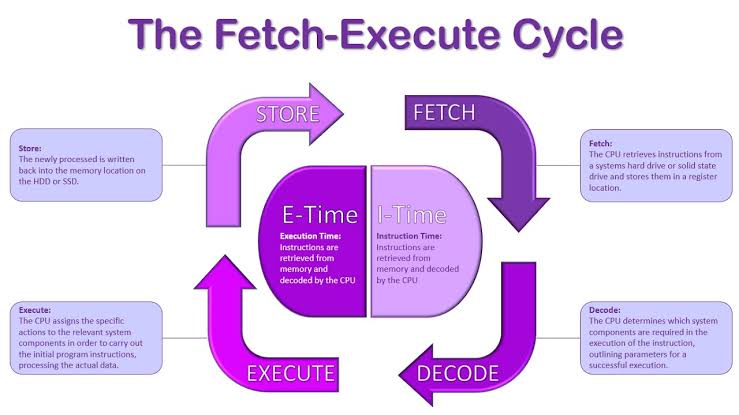
—->> Instruction Cycle: In the computer designing , there involves computer organisation which uses registers in the instruction cycles.The instruction cycle is also called fetch-decode-execute cycle, which the central processing unit (CPU) follows from boot-up till the computer has shut down in order to process instructions.It has three important stages which are:
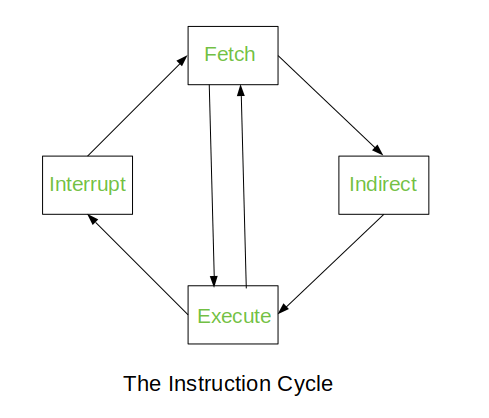
The Indirect Cycle is always followed by the Execute Cycle. The Interrupt Cycle is always followed by the Fetch Cycle. For both fetch and execute cycles, the next cycle depends on the state of the system.
—->> Memory reference instructions: The decoded output Di for i = 1,2,3,4,5 and 6 from the operation decoder that belongs to each instruction is included in the table.The effective address of the instruction is in the address register AR and was placed there during timing signal T(2) when I=0, or during timing signal T(3) when I=1. The execution of the memory reference instructions starts with the timing signal t(4).The data must be read from memory to a register where they can be operated on with logic circuits.There are seven memory reference instructions which are as follows :
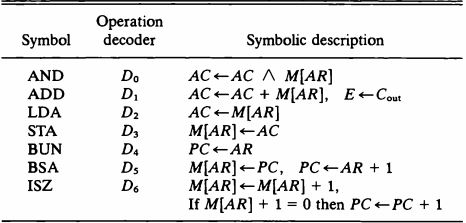
AND TO AC: This is an instruction that performs an AND logic operation on pairs of bits in AC and the memory word specified by the effective address.The result is transferred to AC. Two timing signals are needed to execute this instruction.The clock transistion associated with the timing signal t(4) transfers the operand from memory into DR. Likewise the timing signal associated with t(5) transfers the results between the contents of DR and AC.
ADD TO AC: This instruction adds the contents of the memory word specified by the effective address to the value of AC.The sum is transferred into AC and the output carry C(out) is transferred to E(extended accumulator) flip flop.After the instruction is fetched from memory and decoded only one output of the operation decoder will be active and that output determines the sequence of micro operations that the control flows during the execution of a memory reference instruction.
Load to AC-(LDA): This instruction transfers the memory word specified by the effective address to AC.It is necessary to read the memory word into DR first and then transfer the content of DR into AC.The reason for not connecting the bus to inputs of AC is the delay encountered in the adder and logic circuit.
Store AC-(STA): This instruction stores the content of AC into the memory word specified by the effective address.This instruction is executed with one micro operation since it is connected to a bus.
Branch Unconditionally-(BUN): This instruction transfers the program to the instruction specified by the effective address.The BUN instruction allows the programmer to specify an instruction out of the sequence and we say that the program branches unconditionally.
Branch and save return address-(BSA): This instruction is useful for branching to a portion of a program called a subroutine or procedure. When executed, the BSA instruction stores the address of the next instruction in sequence into a memory location specified by the effective address. The effective address plus one is then transferred to PC to serve as the address of the first instruction in the subroutine.
Increment and skip if zero-(ISZ): This instruction increments the word specified by the effective address, and if the incremented value is equal to zero , PC is incremented by 1.

Input-Output Configurations: The terminal sends and receives serial information. Each quantity of information has eight bits of an alphanumeric code. The serial information from the keyboard is shifted into the input register INPR. The serial information for the printer is stored in the output register OUTR. These two registers communicate with a communication interface serially and with the AC in parallel.
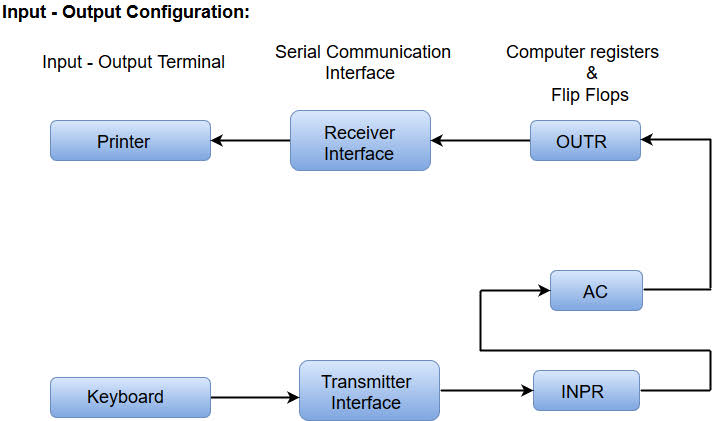
—->> Input -Output Instructions: These instructions are needed for transferring information to and AC register, for checking the flag bits and controlling the interrupt facility. These instructions have an operation code 1111 and they are recognized by the control when D(7)=1 and I = 1.
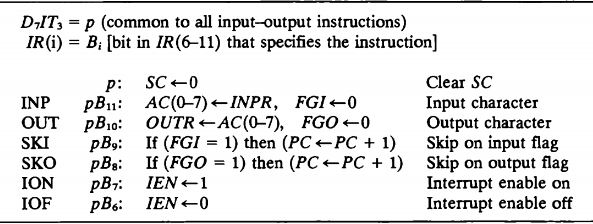
The INP instruction transfers the input information from INPR into the eight low-order bits of AC and also clears the input flag to 0. The OUT instructions transfers eight least significant bits of AC into the OUTPUT register OUTR and clears the out put flag to 0.
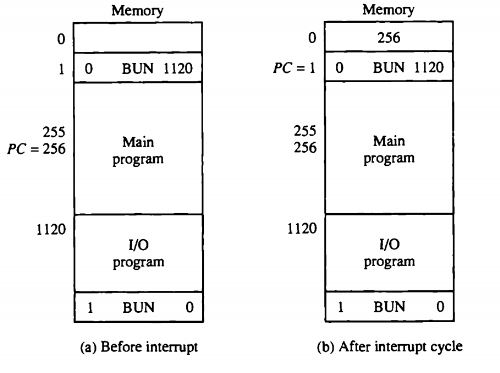
—->> Interrupt Cycle: This cycle is initiated after the last execute phase if the interrupt flip flop R is equal to 1. This flip flop is set to 1 if IEN = 1 either FGI or FGO are equal to 1. This can happen with any clock transition except when timing signals T(0),T(1) or T(2) are active.The interrupt cycle stores the return address into memory location 0, branches to memory location 1, and clears IEN, R and SC to 0.
*LINKS OF VIDEOS:
This is an example post, originally published as part of Blogging University. Enroll in one of our ten programs, and start your blog right.
You’re going to publish a post today. Don’t worry about how your blog looks. Don’t worry if you haven’t given it a name yet, or you’re feeling overwhelmed. Just click the “New Post” button, and tell us why you’re here.
Why do this?
The post can be short or long, a personal intro to your life or a bloggy mission statement, a manifesto for the future or a simple outline of your the types of things you hope to publish.
To help you get started, here are a few questions:
You’re not locked into any of this; one of the wonderful things about blogs is how they constantly evolve as we learn, grow, and interact with one another — but it’s good to know where and why you started, and articulating your goals may just give you a few other post ideas.
Can’t think how to get started? Just write the first thing that pops into your head. Anne Lamott, author of a book on writing we love, says that you need to give yourself permission to write a “crappy first draft”. Anne makes a great point — just start writing, and worry about editing it later.
When you’re ready to publish, give your post three to five tags that describe your blog’s focus — writing, photography, fiction, parenting, food, cars, movies, sports, whatever. These tags will help others who care about your topics find you in the Reader. Make sure one of the tags is “zerotohero,” so other new bloggers can find you, too.

 computer